The Day I Found 53 Chrome Profiles on a Single School Computer
 Mohit Shrestha
The Day I Found 53 Chrome Profiles on a Single School Computer
I'll never forget that Tuesday afternoon .
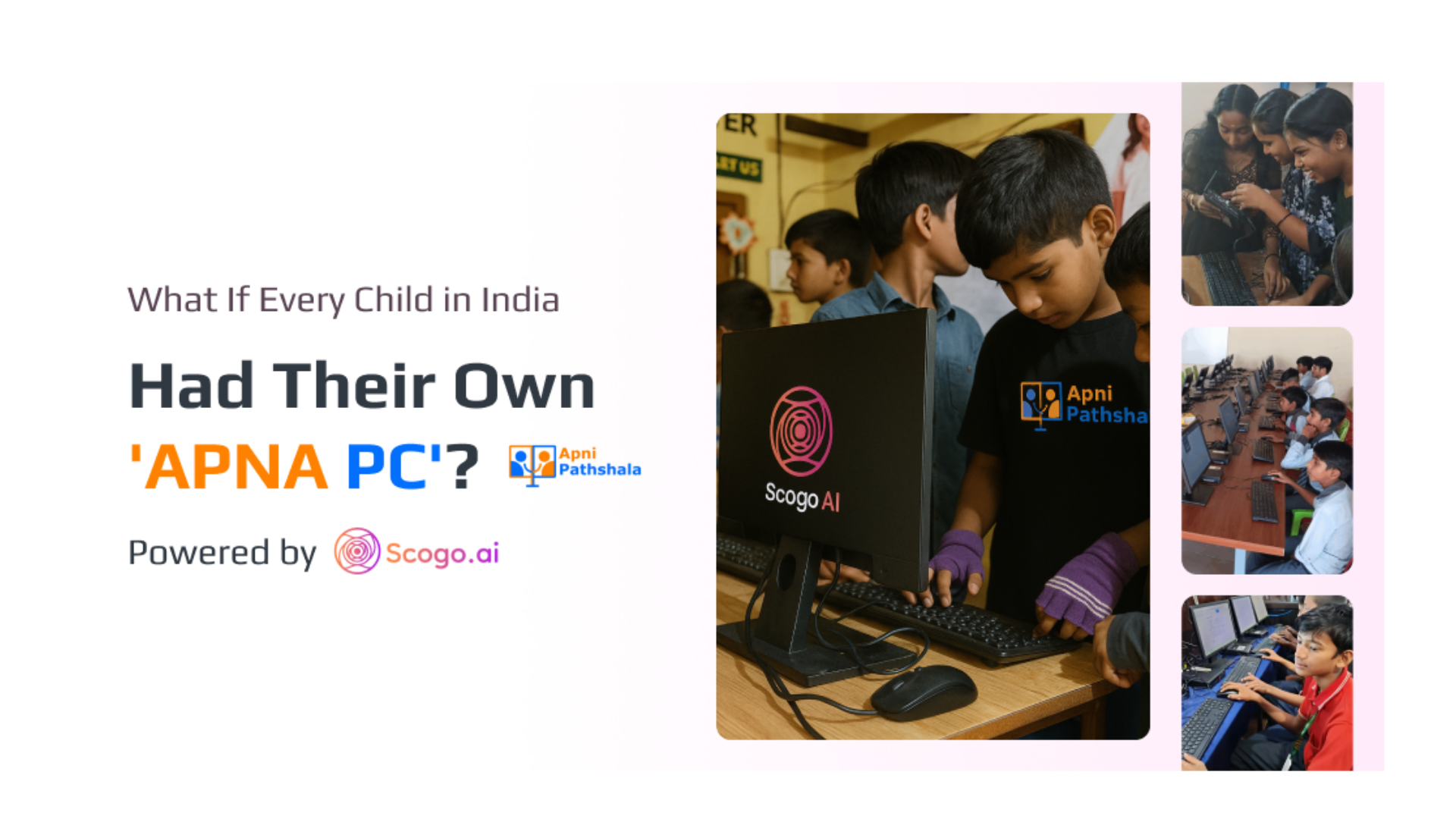
We were three weeks into rolling out computers for Apni Pathshala—this incredible organization bringing digital literacy to underprivileged kids across India. The excitement was electric. Finally, these kids would have access to technology. A real chance. A shot at a different future.
I walked into a classroom in the Mumbai region, and my stomach dropped.
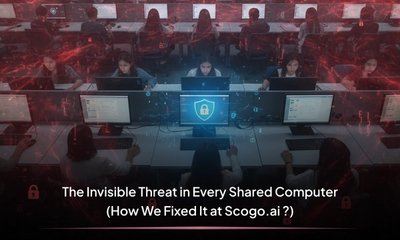
The desktop was plastered with anime wallpapers. Random icons scattered everywhere like confetti. When I opened Chrome, I started counting user profiles. I counted once. Then twice, because I couldn't believe it.
Fifty-three different user profiles. On a single shared computer.
The Beautiful Vision That Met Ugly Reality
Let me back up for a second.
Apni Pathshala had this ambitious vision: create a nationwide network of learning PODs—small digital learning centers with 10 computers each—bringing technology to communities where kids had never even touched a mouse. Beautiful mission, right?
Dr. Aniruddha Malpani, the visionary behind what would become APNA PC, had a simple belief: every child deserves access to safe, structured, empowering technology. Not expensive technology. Not complicated technology. Just good, solid, reliable computing that actually helps them learn.
He'd seen it firsthand through his work with Apni Pathshala. Kids from communities where a computer was as foreign as a spaceship. Families where one laptop could change three generations. The goal? Reach as many as unpriviledged kids students through Multiple PODs set across India, from Jammu & Kashmir to Tamil Nadu.
But nobody—not Dr. Malpani, not the Apni Pathshala team, not us at Scogo.AI—nobody was prepared for what we'd find when we actually put computers in classrooms.
Curiosity Meets Zero Guardrails
Here's what nobody tells you about giving computers to curious, tech-savvy kids: they're really, really good at finding workarounds.
Students had figured out how to:
- Create unlimited Chrome profiles (thus the 53), zero security .
- Download gaming apps and social media tools despite browser blocks
- Change system passwords and lock administrators out completely
- Install desktop versions of TikTok, Instagram, WhatsApp when websites were restricted
- Create new admin users, delete the original ones, and walk away
One machine was completely bricked. A student had created a new admin account, changed all passwords, deleted the old admin user, and... vanished. We stood there with a ₹30,000 paperweight, waiting for a kid who might never come back to unlock it.
This wasn't vandalism. This was curiosity meeting zero boundaries.
And honestly? I couldn't even be mad. These kids were brilliant. They'd taught themselves system administration through pure trial and error. In another context, we'd call them prodigies.
But this wasn't that context. This was a learning environment falling apart faster than we could hold it together.
The Phone Call That Changed Everything
It started with a phone call.
Dr. Malpani called out Scogo.ai ,our CEO, Nitin Dhawal, and CTO, Karan Singh, for an urgent meeting.
“can you help us make this work? The machines are in complete chaos. Pod leaders are spending more time troubleshooting than teaching. We're losing hours every day to password resets and system recoveries.”
There was a long silence. Then Dr. Malpani said something we’ll never forget:
“We just discovered the real problem. Access without structure isn’t empowerment—it’s expensive chaos. So let’s build the structure.”
That's when the APNA PC vision crystallized. Not just computers for education. Computers designed FOR education. From the ground up.
Dr. Malpani laid out the requirements:
- Students should only be able to do what they came to do: learn
- Teachers shouldn't need IT degrees to manage technology
- Parents should have complete visibility without being intrusive
- The system should get smarter over time, not more complicated
- And above all: it needs to work for the 19-year-old pod leader in rural Rajasthan just as well as it works for the central IT team in Mumbai
- An AI-powered ecosystem that helps students learn smarter while building a personalized LMS from their learning data itself.
And we are like , Lets Do It !
That's when Scogo.AI got to work.
Building Invisible Walls (The Good Kind)
We spent the next three months building what would become Nexus RMM ( Remote Monitoring and Management) and Nexus SafeNet—not from theory, but from watching pod leaders' faces when they discovered another student had spent three hours playing PUBG instead of learning Excel.
Here's what we built into every APNA PC:
From Chaos to Control: The Power of Nexus RMM
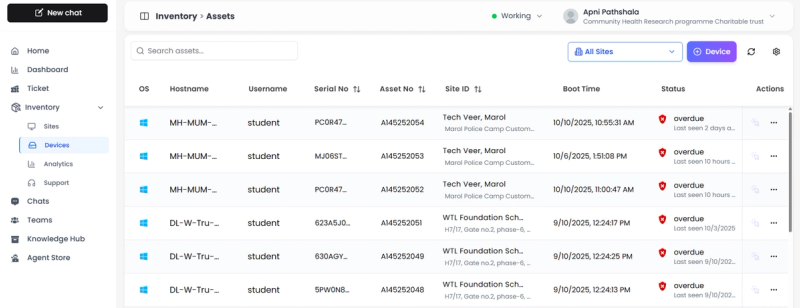
With just a single click, the Scogo.ai Nexus RMM agent installs on any machine — instantly giving the central team full visibility and control.Centralised Inventory management automatically and also Central team can now monitor machines administratively remotely , run scripts, execute commands, apply patches, install or remove software, and even take remote access anytime the machine is online — no more relying on tools like AnyDesk.The vision behind Nexus RMM (Remote Monitoring and Management) was simple yet transformative — to give central IT teams eyes and hands across every student machine, without ever feeling intrusive.
With a single-click installation, the Scogo.ai Nexus RMM agent instantly brings any device under a unified dashboard. The moment it’s installed, that machine becomes visible, manageable, and secure — eliminating the old chaos of running from classroom to classroom or juggling temporary tools like AnyDesk.
Now, the central team gains full control without the headache:
- Monitor system health — instantly view machine status, uptime, and performance insights.
- Run commands and scripts — automate repetitive admin tasks like OS updates, software installs, or performance checks.
- Take remote access — troubleshoot issues or assist students seamlessly, anytime the machine is online.
- Manage software centrally — install, uninstall, or patch applications without interrupting the learning experience.
Behind the scenes, centralized inventory management keeps everything organized and up to date. The result? Educators focus on teaching, students stay uninterrupted, and technology quietly does what it’s meant to — work effortlessly in the background.
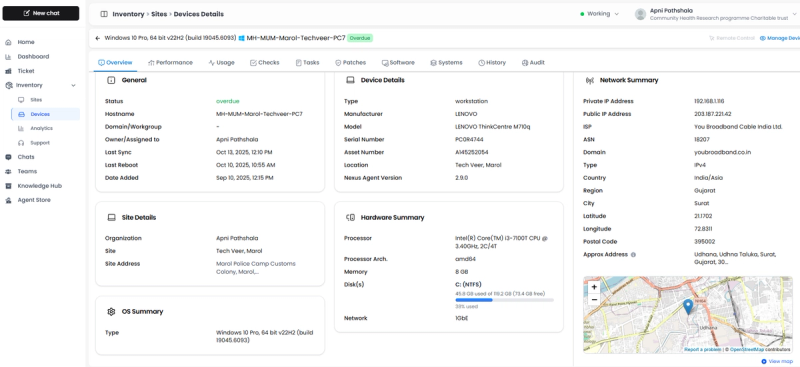
Nexus RMM’s automated policies trigger a series of predefined scripts the moment a device connects to the internet: setting wallpapers, renaming hostnames, removing unwanted browsers, installing Chrome, and more.But the most critical first step? OS Hardening — where Nexus RMM automatically creates three secured user accounts on every machine.
- Student User – Passwordless login, basic user rights only
- Admin User – Password held by Apni Pathshala central team only
- IT Support User – For Scogo.AI technical troubleshooting when needed
Students can't install software. Can't create new users. Can't change passwords or even wallpapers. They can only do what they came to do: learn.
Sounds restrictive? Here's the reality we discovered: boundaries create freedom.
When students knew they couldn't game the system, they stopped trying. When teachers knew machines wouldn't get bricked overnight, they started focusing on curriculum. When parents knew their kids couldn't access dangerous content, they encouraged computer time instead of fearing it.
Nexus Safenet : The Chrome Enterprise Revolution:
Nexus SafeNet tackles the browser mess head-on:
- Converts Chrome to enterprise mode under Scogo.AI management
- Requires student authentication before ANY internet access given to them . Credentials already shared by POD leaders to the students .
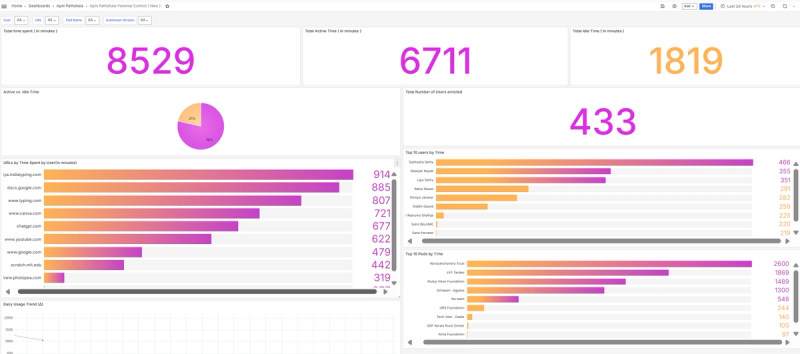
- Logs everything—active time, browsing history, even whether they're watching videos/
- Blocks incognito mode and multiple profiles completely
- Prevents extension deletion or browser changes
- Creates clean, controlled browsing for shared systems
- Restriction dashboard where you can restrict users from watching certain domains.
- A centralized monitoring Dashboard for Parents and Central Team .
No more 53 profiles. No more security nightmares. No more one kid accessing another kid's Gmail and sending fake emails (yes, that happened).
Fast forward to today.
Apni Pathshala now has students learning daily through digital PODs across multiple states, and every single machine runs the Nexus stack.
But here's the bigger vision—the one that keeps Dr. Malpani up at night in the best way:
What if every child in India had access to an APNA PC?
Not just in Apni Pathshala PODs. In government schools. In libraries. In community centers. In homes where parents save for months to buy their kid a laptop.
APNA PC isn't just a computer. It's a philosophy:
- Zorin Linux-based (affordable,secure, customizable, no licensing headaches)
- Nexus RMM pre-installed (Remote monitoring management tool for Inventory management and remote control )
- Nexus SafeNet configured (safe browsing out of the box and Parental control monitoring of Student learning Data )
- Nexus Endpoint ( Beta version of AI Copilot for student learning and logging issues if any to the central team , getting lightening fast support )
Parents buying their first family computer? It comes with parental controls that actually work. Schools setting up labs? Management is automated. NGOs starting learning centers? Technical complexity is eliminated.
Scogo.AI's role? They're building the invisible infrastructure that makes it all possible. The backend systems that scale from 10 computers to 10,000. The AI models that get smarter with every interaction. The security architecture that protects without constraining.
Why This Matters Beyond Classrooms
That Tuesday when I found 53 Chrome profiles? That wasn't an Apni Pathshala problem. That's everywhere.
Public libraries. Co-working spaces. Community centers. Refugee camps. Homes with three kids sharing one laptop.
Anywhere you find shared computers, you find the same chaos:
- Privacy violations (one user accessing another's accounts)
- Security nightmares (malware, inappropriate content, system corruption)
- Management hell (who changed what, and can we undo it?)
The traditional solution? Buy more computers, hire more IT staff, implement complicated policies nobody follows.
The APNA PC solution? Build it right from the start.
Scogo.AI's Nexus platform isn't just for schools. It's for anyone who believes technology should be accessible, safe, and actually useful. That computers should work for humans, not the other way around.
Dr. Malpani imagined a better system. And Scogo.AI built it.
Those 53 Chrome profiles taught me more about digital education than any research paper ever could. They taught me that:
- Kids will push every boundary you don't set (and that's okay—it's called learning)
- Teachers need tools that empower, not more responsibilities that exhaust
- Parents deserve peace of mind without becoming surveillance officers
- Technology companies have a responsibility to build things that actually serve their stated purpose
The future of educational technology isn't more features. It's better foundations.
The bottom line: Dr. Malpani saw what was possible—an India where every child has access to safe, empowering technology. Scogo.AI is making it real, one APNA PC at a time.
From chaos to clarity. From 53 profiles to structured learning. From stressed pod leaders to empowered educators.
That's not just better technology. That's transformation.
What boundaries need setting in your digital learning spaces? And what becomes possible when structure replaces chaos?
Ready to Experience Smarter Infrastructure?
See how https://scogo.ai, Nexus RMM, and Safenet can transform your shared systems.
Book a demo now to experience it live or let’s connect directly:
- Book a Demo with us : Book a Demo with Scogo.ai
- Connect with me on LinkedIn: Mohit's LinkedIn
We’re excited to help you build safer, smarter learning environments!
Cheers !